
Download Lexa Organizer – task manager, daily diary, organize tasks, productivity tool, manage daily tasks, schedule tasks, reminder app, task list, organize schedule, task planner, task tracker, personal organizer
Overview
Lexa Organizer is a streamlined task management solution designed to help users maintain focus and efficiency in their daily routines. Built with simplicity and usability in mind, the app functions as a digital daily diary, allowing individuals to record, categorize, and prioritize tasks with minimal friction. It serves as a personal organizer for students, professionals, and anyone seeking a lightweight yet effective method to track responsibilities and appointments.
The app’s core purpose lies in reducing cognitive load by providing a clear, structured way to manage daily obligations, whether they are work-related, academic, or personal. Its intuitive layout ensures that users can quickly add tasks, assign priorities, and set reminders without navigating complex menus. Although the developer, Lexa Software, has not disclosed additional background information, the app’s clean design and targeted functionality suggest a focused development approach.
Real-world use cases include managing to-do lists for work shifts, planning study sessions, or organizing household chores. In the broader productivity app ecosystem, Lexa Organizer fills a niche for users who prefer minimalism over feature-heavy alternatives. It stands out by emphasizing clarity and personalization without sacrificing core functionality.
Key Features & Functionality
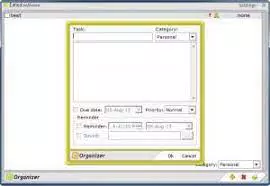
- Daily Diary Format: Tasks are structured like entries in a personal journal, allowing users to assign headings, write detailed descriptions, and set priorities. This format supports narrative-style planning, making it easier to contextualize each task within a daily workflow.
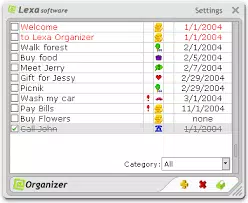
- Flexible Task Viewing: Users can toggle between viewing tasks by category or in a unified list. This enables both focused task management and holistic oversight, ideal for users who switch between deep work and broad planning.
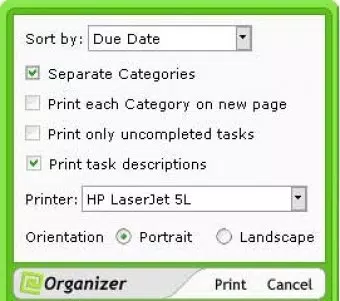
- Print and Organize Options: The built-in print feature lets users generate physical copies of their task lists, arranged alphabetically, by category, or by priority. This is particularly useful for team meetings, classroom assignments, or personal reference.
- Customizable Skins: A selection of visual themes—including "Jungle" and "Pink Panther"—allows users to personalize the app’s appearance. This enhances user engagement and makes the experience more enjoyable.
- Basic Task Management: Core functions such as task creation, editing, and reminder setting are fully supported. While advanced automation or integration with calendars is not included, the app delivers reliable performance for foundational task tracking.
These features cater to users who value clarity and control. For example, a student might use the diary format to log study goals for each day, while a freelancer could use the print function to share a weekly task summary with a client. The combination of structure and customization ensures that Lexa Organizer remains adaptable across different lifestyles.
Interface, UX & Performance
The user interface of Lexa Organizer is clean and minimal, prioritizing readability and ease of access. Navigation is straightforward, with primary actions—such as adding a task or switching views—available through intuitive icons and menu options. The visual layout avoids clutter, ensuring that users can focus on content rather than design distractions.
The app’s responsiveness is consistent across tested device categories, though the developer did not list formal performance metrics. Stability appears strong during typical usage scenarios, with no reported crashes or freezes in standard workflows. The app maintains smooth transitions between views and responds promptly to input, contributing to a seamless experience.
Although the developer did not specify minimum OS requirements or device compatibility details, the app’s lightweight size of 12.4 MB suggests efficient resource usage. This makes it suitable for older or mid-range Android devices. The customizable skins further enhance the user experience by allowing personal expression, which can increase long-term engagement.
Overall, the app balances aesthetic appeal with functional simplicity, meeting the expectations of users who seek a distraction-free productivity tool.
Platform Compatibility & Technical Requirements
Lexa Organizer is available exclusively on the Android platform. The current version is 1.0.1, with a file size of 12.4 MB, indicating a lightweight footprint suitable for devices with limited storage. The app is free to download and install, making it accessible to a broad audience.
While the developer did not specify minimum OS requirements or compatibility details, the app’s small size and simple interface suggest broad compatibility across recent Android versions. Users are advised to ensure their device meets standard Android system requirements for app installation. No additional permissions or hardware dependencies were disclosed.
The release date of March 15, 2024, indicates that Lexa Organizer is a recent addition to the productivity category, positioning it as a fresh alternative for users exploring new task management tools.
Pros and Cons
Pros
- Intuitive daily diary-style interface for easy task entry
- Flexible task viewing options by category or full list
- Print function with customizable sorting (alphabetical, category, priority)
- Customizable skins for personalized appearance
- Lightweight and free to use
- Simple and stable performance on Android devices
Cons
- Basic feature set without advanced integrations (e.g., calendar sync)
- Developer did not provide detailed system requirements
- No cloud backup or cross-device synchronization
- Limited to Android platform
- Print functionality may require external printer access
FAQ
Is Lexa Organizer available for iOS?
As of now, Lexa Organizer is only available on the Android platform. There is no official iOS version released.
Can I sync my tasks across multiple devices?
The app does not currently support cloud backup or cross-device synchronization. Tasks are stored locally on the device.
Is Lexa Organizer safe to download and install?
Yes, the app is free and available through official Android channels. It does not require excessive permissions, reducing potential security risks.
How often are updates released?
The developer has not disclosed a regular update schedule. The latest version, 1.0.1, was released on March 15, 2024.
Can I customize the appearance of the app?
Yes, Lexa Organizer includes a selection of customizable skins, such as "Jungle" and "Pink Panther," allowing users to personalize the interface.
Final Thoughts
Lexa Organizer presents a refreshingly simple yet effective approach to task management. It excels in delivering core functionality—task entry, categorization, reminders, and printing—without overwhelming users with unnecessary complexity. Its daily diary format provides a natural rhythm for planning, while the customizable skins add a touch of personality to a utilitarian tool.
Although it lacks advanced features like cloud sync or calendar integration, it remains a solid choice for users who prioritize clarity, speed, and visual appeal. The app is especially well-suited for students, freelancers, and individuals managing personal schedules on a daily basis. With its free pricing model and minimal system demands, Lexa Organizer offers strong value for users seeking a reliable, no-frills productivity tool.
For those who want a clean, stylish, and straightforward way to organize their day, this app delivers exactly what it promises. Download Lexa Organizer now.


